
Message Automations
Set it once, delight every guest
Trigger automated messages at key moments throughout the guest journey - booking confirmation, pre-arrival, check-in instructions, mid-stay check-up, check-out reminders, and review requests. Full conditional logic with AI-assisted creation.
Try It Free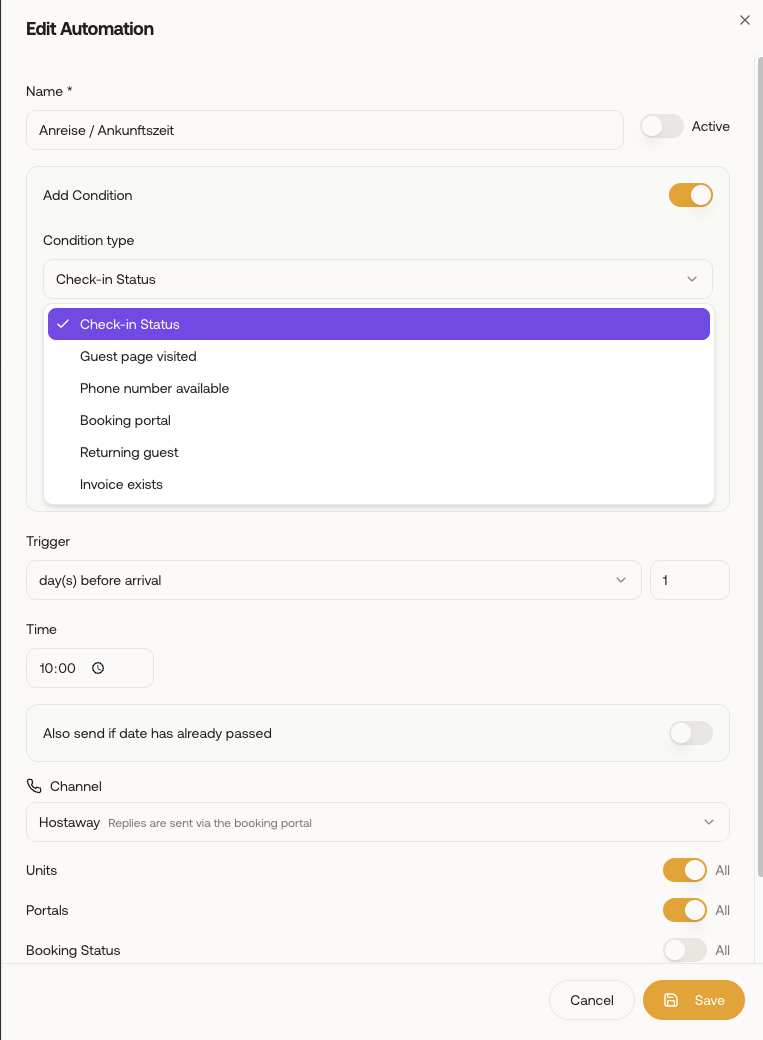
What you gain
Every feature creates value for both sides - you and your guests.
For the Host
Guest communication on autopilot
For the Guest
The right info at the right time
How it works
A step-by-step look at the experience.
Define automations with precise triggers: X days/hours before check-in, after check-in, before check-out, after check-out, on booking creation, or on cancellation.
Each automation links to a message template with merge tags that auto-fill guest-specific data (name, dates, access codes, Wi-Fi, directions).
Conditional logic: send different templates based on conditions - e.g., if the guest completed online check-in, send the welcome message; if not, send a reminder.
Scope automations to specific units or booking statuses (only confirmed, not cancelled).
AI automation builder: describe what you want ("Send check-in instructions 24 hours before arrival with the door code") and AI creates the full automation.
Each automation shows an active/inactive toggle, trigger description, linked template, and execution log.
Feature deep dive
Detailed look at every capability within Message Automations.
Automation Builder
Create automations with: name, trigger type (before check-in, after check-out, on booking, etc.), trigger timing (days/hours offset), linked message template, scope (units, portals, booking statuses), and conditional logic.
Trigger Types
Available triggers: on booking creation, X days before check-in, on check-in day, X hours after check-in, X days before check-out, on check-out day, X days after check-out, on cancellation. Each with customizable time offset.
Conditional Logic
Add conditions: if check-in form completed → send Template A; if not completed → send Template B. Conditions check booking data, check-in status, and guest attributes.
AI Automation Creator
Open the AI dialog, describe your automation in plain language (e.g., "Send a welcome message on the day of arrival with Wi-Fi info"). AI generates the automation configuration and linked template. Review and activate.
Execution Log
Each automation tracks when it last fired, which guest received the message, and delivery status. Useful for debugging why a specific guest didn't receive expected communication.