
Booking Overview
Every reservation, one table
Track every booking from every channel in one unified table. See guest details, payment status, nightly rates, cleaning fees, commissions, tourist tax, special requests, and booking modifications - all filterable and exportable.
Try It Free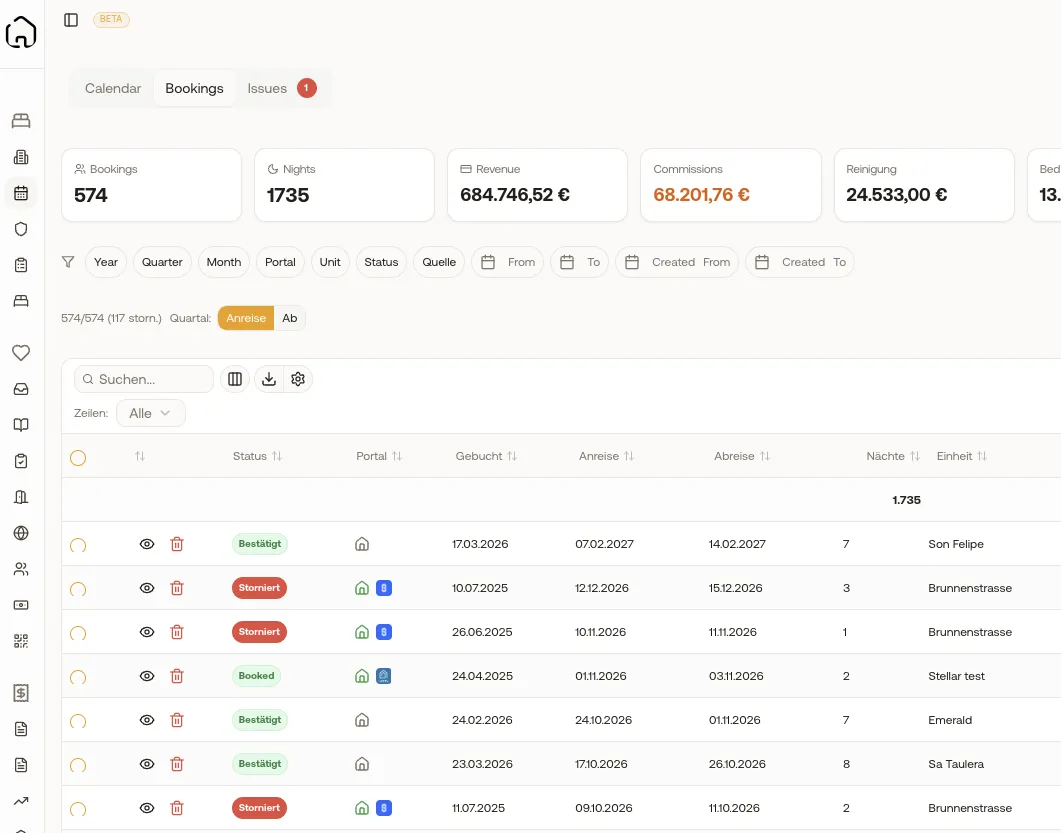
What you gain
Every feature creates value for both sides - you and your guests.
For the Host
Financial clarity per booking
- See true net revenue after all commissions, fees, and taxes - no more guessing what you actually earned.
- One unified table replaces checking multiple systems separately.
- Cancellation tracking with modification history so you always know what changed and when.
- Quick-access guest contact details let you reach out directly from the booking view.
- CSV export enables easy reconciliation with bank statements and tax preparation.
For the Guest
Accurate, responsive booking management
- Your host has instant access to your booking details - no fumbling through emails to find your reservation.
- Modification requests are tracked properly - nothing gets lost.
- Payment transparency means no disputes over what was charged and why.
How it works
A step-by-step look at the experience.
Every booking shows guest name, arrival/departure, property, channel source, nightly price, cleaning fee, and total revenue.
Commission tracking breaks down platform fees and payment processing charges - so you see true net revenue per booking.
Tourist tax (Kurtaxe/Bettensteuer) is calculated automatically based on guest count, nights, and local tax rates configured per unit.
VAT calculations for accommodation (7% in Germany) and cleaning (19%) are handled automatically, including reverse-charge for international guests.
Filter by date range, property, channel, booking status (confirmed, cancelled, checked-in), or payment status.
Export the filtered view to CSV for external analysis, reconciliation with bank statements, or sharing with accountants.
Feature deep dive
Detailed look at every capability within Booking Overview.
Booking Table
Full-width data table with columns: guest, property, dates, source, nightly rate, cleaning fee, commission, tourist tax, total, payment status. Sort by any column. Inline search.
Booking Detail Dialog
Click any booking to see full details: guest info, payment breakdown, special requests, modification history, linked invoices, and linked tasks. Direct links to the guest's CRM profile and the property's calendar.
Financial Breakdown
Each booking shows: gross revenue, platform commission, payment processing fee, net revenue, accommodation VAT (7%), cleaning VAT (19%), tourist tax, and total. All calculated automatically from booking data and unit settings.
Filters & Saved Views
Filter by: date range, property, booking source, status (confirmed/cancelled/checked-in/checked-out), payment status (paid/unpaid/partial). Save filter combinations as named views for instant access.
CSV Export
Export the current filtered view to CSV. Includes all columns and calculated fields. Useful for accountant handover, bank reconciliation, and custom analysis in Excel.
More in Operations
Visual Calendar
Your entire portfolio at a glance
Unit Management
Manage every property detail
Tasks & Cleaning
Automated cleaning & maintenance
Nuki Integration
Native Nuki smart lock control
Ring Integration
Video doorbell & intercom control
Smart Lock Hub
50+ brands via Seam API
Access Log & Audit
Complete security tracking
Pricing & Revenue
Smart pricing across your portfolio